Resell your keys
Resell capacity on an upstream API key you already pay for. Instead of running a GPU, you enroll a key and set resale prices; the UsePod gateway dispatches matched requests directly to the upstream on your behalf and settles the marketplace split to you. We call a listing like this a key relay (you may have seen this pattern called BYOK, “bring your own key”).
Enroll and price your catalog at usepod.ai/host. The
BYOK tab is one screen: pick the upstream, add your key, set a payout wallet
and an optional daily spend cap, then review the auto-priced model catalog before
enrolling.
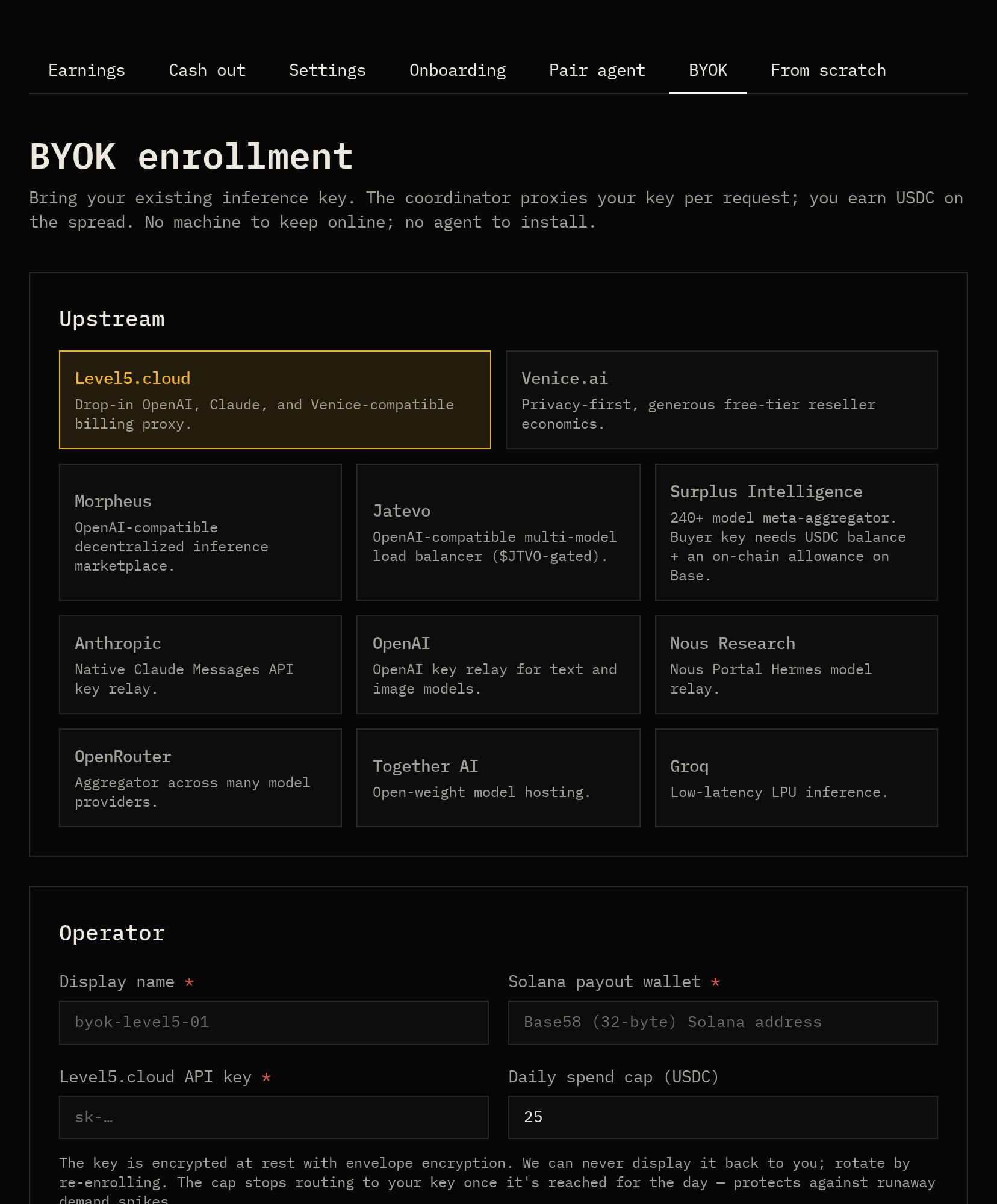
Supported upstreams
Section titled “Supported upstreams”| Upstream | Notes |
|---|---|
| Level5 | Drop-in OpenAI/Claude/Venice-compatible billing proxy |
| Venice | Privacy-first reseller economics |
| Morpheus | OpenAI-compatible decentralized inference |
| OpenAI | Key relay for text and image models |
| OpenRouter | Aggregator across many providers |
| Together AI | Open-weight model hosting |
| Groq | Low-latency LPU inference |
How to price
Section titled “How to price”You set a resale price per model, as two numbers: price per million input tokens and per million output tokens. Three rules govern what those numbers can be and whether they earn.
1. You are capped at the cheapest centralized price
Section titled “1. You are capped at the cheapest centralized price”For any model UsePod also serves centrally, your listing can never win above
the cheapest centralized price, on either axis. At routing time the gateway
computes a ceiling of min(user's price ceiling, cheapest centralized price)
and filters out any listing above it. List above centralized on input or
output and you simply won’t be selected, the request goes to the centralized
fallback instead. Price at or below centralized on both axes to be eligible.
2. The dashboard suggests a markdown off that ceiling
Section titled “2. The dashboard suggests a markdown off that ceiling”When you build your catalog at usepod.ai/host, each model’s price is
pre-filled at a 20% markdown off its base price, where the base is the
cheapest centralized price for that model if one exists, otherwise the
upstream’s own list price. Adjust per model or apply a bulk markdown. A larger
markdown wins more traffic (you’re cheaper) but thins your margin.
3. Your upstream bill is still yours
Section titled “3. Your upstream bill is still yours”UsePod bills the user at your listed price and credits you the provider share. It does not pay your upstream. Your margin is:
your 80% share − what your upstream charges you for those tokensSo price above your real upstream cost, not just below centralized. If your upstream cost for a model is higher than 80% of the centralized price, that model can’t be profitable to relay, leave it out of your catalog.
4. Optional: a daily spend cap
Section titled “4. Optional: a daily spend cap”You can set a daily spend cap (USDC) on a relay. Once your credited earnings in the last 24 hours reach the cap, your listings drop out of routing until the window rolls forward. This bounds how much upstream cost you can incur in a day, useful when you’re reselling a metered or rate-limited key.
How routing selects you
Section titled “How routing selects you”A request reaches your relay only if it wins selection. The gateway:
- Normalizes the model id. Matching is by canonical model id, so vendor
prefixes are stripped (
deepseek/deepseek-v4anddeepseek-v4match the same listing). Your listing maps a canonical model (what users request) to yourprovider_model_id(what your upstream advertises). On dispatch the gateway rewrites the upstream request’smodelfield to yourprovider_model_id, so it must be exactly what the upstream expects, or the call fails. - Builds the candidate set. All enabled listings for that canonical model, on active providers (bond posted; not suspended or banned), whose daily spend cap is not exhausted.
- Sorts cheapest first by input + output price (ties broken by input price, then earliest enrollment).
- Filters each candidate in price order. A key relay is eligible when it is not throttled, and its input and output prices are both at or below the ceiling from rule 1. Unlike self-hosted GPU providers, a key relay does not need a live connection and is not capacity-checked, your key is always considered available (subject to the daily cap).
- First survivor wins. In
autorouting the request falls through to the centralized fallback if no relay qualifies. Inmarketplace-onlyit returns402 no_provider_at_price.
The practical takeaway: routing is lowest-price-wins among eligible listings. To win consistently for a model, be the cheapest eligible relay for it.
See Routing & matching for the full algorithm.
When your key actually earns
Section titled “When your key actually earns”You earn the provider share on a request only when all of these hold:
- Your provider is active (bond posted; not suspended or banned).
- You have an enabled listing whose canonical model matches the request, and
whose
provider_model_idmatches what your upstream serves. - Your input and output prices are at or below the cheapest centralized price, and at or below the user’s price ceiling if they sent one.
- You are not throttled, and your daily spend cap is not reached.
- You are the cheapest eligible listing (you win the price sort).
- The upstream call succeeds. A failed dispatch earns nothing, the request fails over to the next candidate or to centralized, and no settlement is written.
If any one is false, that request earns you nothing. The most common reasons a
key sits idle are: priced above centralized (rule 1), undercut by a cheaper
relay, or the provider_model_id doesn’t match the upstream.
The split
Section titled “The split”On a successful request the user is billed gross = tokens × your listed price,
then split:
| Party | Share |
|---|---|
| You (provider) | 80% |
| Treasury | 20% |
Worked example, a listing at $0.40/M input and $0.60/M output serving a request of 50,000 input + 20,000 output tokens:
gross = 50,000 × $0.40/M + 20,000 × $0.60/M = $0.032you (80%) = $0.0256treasury (20%) = $0.0064your net = $0.0256 − (your upstream cost for those tokens)Earnings accrue to your provider balance as requests settle. Withdraw on demand, see Earnings & cashout.